Locating your Mac's address, whether it's the IP address, MAC address, or the serial number, is crucial for various purposes such as networking, troubleshooting, and even for security reasons. In this article, we will delve into the different types of addresses associated with your Mac and guide you through the steps to find them.
Understanding Different Types of Addresses
Before we proceed to find your Mac’s address, it’s essential to understand the different types of addresses associated with your device. These include the IP address, MAC address, and the serial number. Each serves a unique purpose and can be found using different methods.
IP Address
The IP (Internet Protocol) address is a unique numerical label assigned to each device connected to a computer network that uses the Internet Protocol to communicate. Your Mac’s IP address can change depending on your network connection, and it’s essential for identifying your device on a local network or the internet.
MAC Address
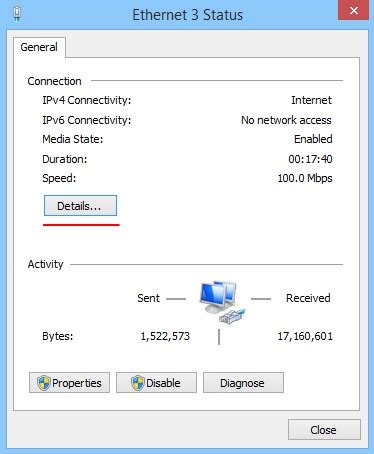
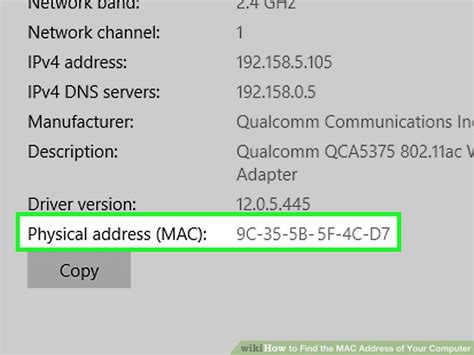
The MAC (Media Access Control) address, also known as the Ethernet address, is a unique identifier assigned to network interfaces for communication at the data link layer of a network segment. The MAC address is usually fixed and does not change, making it useful for identifying devices on a network.
Serial Number
The serial number is a unique identifier assigned to your Mac by Apple. It’s used for registration, warranty purposes, and can also help identify your device in case it’s lost or stolen.
Finding Your Mac’s IP Address
To find your Mac’s IP address, follow these steps:
- Click the Apple menu and select System Preferences.
- Click Network.
- Select your network connection (e.g., Wi-Fi or Ethernet) from the left side of the window.
- Click Advanced.
- Click the TCP/IP tab.
- Your IP address will be listed next to "IPv4 Address" or "IPv6 Address" depending on your network configuration.
Finding Your Mac’s MAC Address
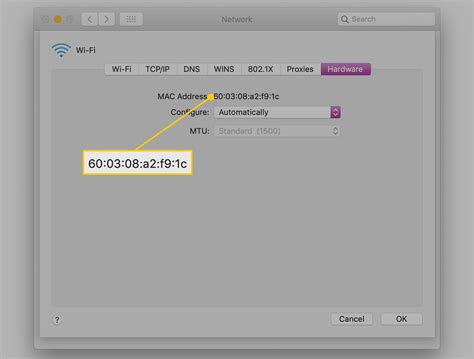
The MAC address can be found in the Network preferences as well:
- Follow steps 1-5 as above to get to the Advanced network settings.
- Click the Hardware or Wi-Fi tab, depending on your connection type.
- Your MAC address will be listed as the "MAC Address" or "Ethernet ID" depending on your Mac model and network connection.
Finding Your Mac’s Serial Number
There are a couple of ways to find your Mac’s serial number:
Using About This Mac
- Click the Apple menu and select About This Mac.
- Click System Report.
- In the System Report window, click Hardware on the left.
- Click Hardware Overview or scroll down to find the serial number listed.
On the Bottom of Your Mac or Packaging
The serial number is also printed on the bottom of your Mac, on the packaging, or on the original receipt from Apple.
Key Points
- IP addresses are used for network identification and can change based on your connection.
- MAC addresses are fixed identifiers for network interfaces.
- Serial numbers are unique to each device and used for registration and warranty purposes.
- You can find these addresses through System Preferences and About This Mac.
- Keeping your device's identifying information secure is crucial for preventing unauthorized access and aiding in recovery if lost or stolen.
| Category | Description |
|---|---|
| IP Address | Unique numerical label for network identification. |
| MAC Address | Fixed identifier for network interfaces. |
| Serial Number | Unique identifier for device registration and warranty. |
Why do I need to know my Mac's IP address?
+Your IP address is necessary for identifying your device on a network and can be required for certain network configurations or troubleshooting purposes.
Can I change my Mac's MAC address?
+While it's technically possible to change a MAC address, it's not a common or recommended practice for most users, as it can cause network issues and may violate the terms of service of some networks.
How do I keep my Mac's serial number secure?
+Avoid sharing your serial number publicly or with unauthorized individuals. Keep the packaging and any documents containing the serial number in a secure location. If your Mac is stolen, report the serial number to the authorities to aid in recovery.
Understanding and managing the different addresses associated with your Mac is essential for both security and functionality. By following the steps outlined in this guide, you can easily find and utilize your Mac’s IP address, MAC address, and serial number, ensuring that you’re always in control of your device’s identity and security.