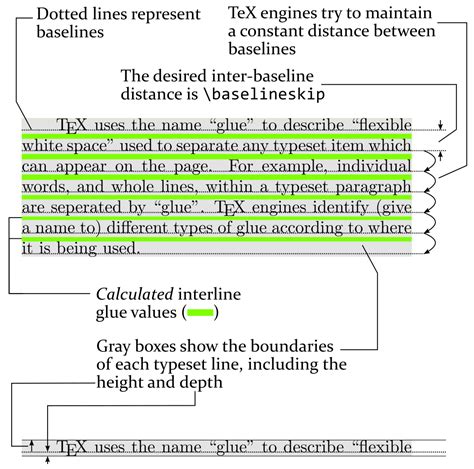
To create a new line in LaTeX, there are several methods you can use, each applicable in different contexts such as within text, equations, or tables. LaTeX is a powerful document preparation system that offers a high degree of control over document formatting and typesetting. Understanding how to create line breaks is essential for formatting your document according to your needs. Here are five ways to create a new line in LaTeX:
1. Using the Line Break Command

The most straightforward way to create a new line in LaTeX is by using the line break command, which is \\ (two backslashes). This command can be used within paragraphs or in environments like tabular for tables or center for centered text. For example:
This is the first line \\
and this is the second line.
Applicability and Limitations
The \\ command is versatile but should be used judiciously, especially within paragraphs, as it can lead to formatting issues if not properly controlled. In standard paragraphs, it’s often better to let LaTeX handle line breaks naturally.
2. Using the newline Command

For a more semantic approach, especially within text, the \newline command can be used. This command is similar to \\ but is more explicit in its intent, making the code easier to understand for humans. For instance:
This is the first line \newline
and this is the second line.
Usage Contexts
The \newline command is particularly useful in contexts where readability of the LaTeX source is important, and you want to clearly indicate a line break without starting a new paragraph.
3. Creating a New Paragraph
A more natural way to create a new line, especially in text, is by starting a new paragraph. This is achieved by leaving a blank line in your LaTeX source code. For example:
This is the first paragraph.

This is the second paragraph.
Implications for Document Structure
Starting a new paragraph is the standard way to create line breaks in text. It allows LaTeX to properly handle spacing between paragraphs and is essential for maintaining a clear and readable document structure.
4. Using the vspace Command
For more control over vertical spacing, the \vspace command can be used. This command allows you to specify an exact amount of vertical space, which can be used to create line breaks with a specific height. For example:
This is the first line.
\vspace{1cm}
This is the second line.
Applications in Document Design
The \vspace command is particularly useful in designing documents where precise control over spacing is necessary, such as in posters, flyers, or any material that requires specific layout adjustments.
5. Line Breaks in Equations
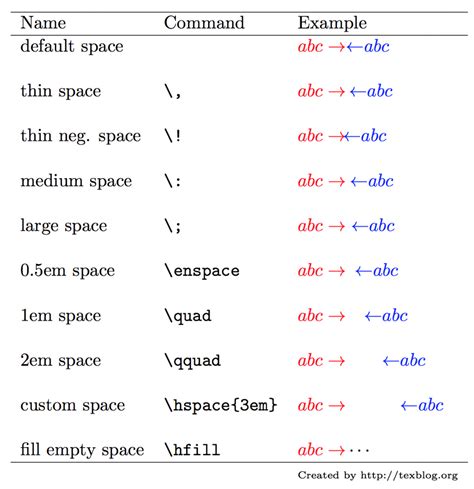
In mathematical equations, line breaks can be achieved using various environments and commands, such as align, gather, and split. For example, the align environment allows multiple lines of equations to be typeset with alignment:
\begin{align*}
a &= b + c \\
d &= e - f
\end{align*}
Mathematical Typesetting
For complex mathematical typesetting, understanding how to use these environments and commands is crucial. They provide a powerful way to typeset equations clearly and professionally.
Key Points
- The `\\` command is used for a line break in most contexts.
- The `\newline` command offers a more semantic way to create line breaks.
- Starting a new paragraph is the standard way to create line breaks in text.
- The `\vspace` command allows for precise control over vertical spacing.
- Specialized environments like `align` are used for line breaks in equations.
In conclusion, mastering the various methods for creating line breaks in LaTeX is essential for producing well-formatted documents. By choosing the appropriate method based on the context, you can ensure your documents are both professionally typeset and easy to read.
What is the most common way to create a line break in LaTeX?
+The most common way to create a line break in LaTeX is by using the \\ command.
How do you create a new paragraph in LaTeX?
+A new paragraph is created by leaving a blank line in your LaTeX source code.
What command is used for precise control over vertical spacing?
+The \vspace command is used for precise control over vertical spacing.